

Personalising Your ChatGPT
Make ChatGPT work the way you like, not the way somebody else thinks you should.

Most people start using ChatGPT without giving much thought to its personality. They ask a question, get an answer and carry on. Over time, ChatGPT may learn something about their preferences, but many people overlook the Personalisation settings that give them much greater control over how it communicates.
You don't need a paid subscription to use Custom Instructions, and you certainly don't need to understand programming or artificial intelligence. A little copying and pasting, some honest answers and perhaps half an hour to an hour of experimenting could make a real difference to how you use ChatGPT for months to come.
You might prefer friendly, enthusiastic conversation, or perhaps you want a straightforward assistant that simply answers questions without unnecessary chatter. You might enjoy humour and emojis, or find them irritating.
My recommendation is to never let somebody else decide your ChatGPT personality for you.
Someone helping you might mean well, but they may choose the style they prefer, not the one that suits you. Their idea of friendly could feel patronising; their idea of direct could feel abrupt. They might overlook the way you speak, the amount of detail you enjoy or the things you find irritating. The result can be a ChatGPT that feels less natural, not more.
There's nothing wrong with someone helping you find the settings or copy the final wording. But the choices, personal details and final approval should be yours. You don't need to hand over your account or private conversations to do this.
It's a personal choice, and there's no single correct way to configure it.
In this guide, I'll explain the available settings and, more importantly, show you how to get ChatGPT itself to help you discover and develop your own ideal experience — entirely within ChatGPT.
1. Finding Your Personalisation Settings
On a desktop or laptop
Open ChatGPT and sign in.
Click your profile icon.
Open Settings, then Personalization, or select Personalization directly if it's available.
Explore the available personality, Characteristics, personal information, Custom Instructions and Memory settings.
On an iPhone or Android phone
Open the ChatGPT app.
Open the sidebar and tap your profile icon to access Settings.
Select Personalization.
Look for personality, Characteristics and Memory options. If you can't find Custom Instructions here, check Customize ChatGPT under Settings.
The precise layout and available features may differ depending on your account, app version and subscription.
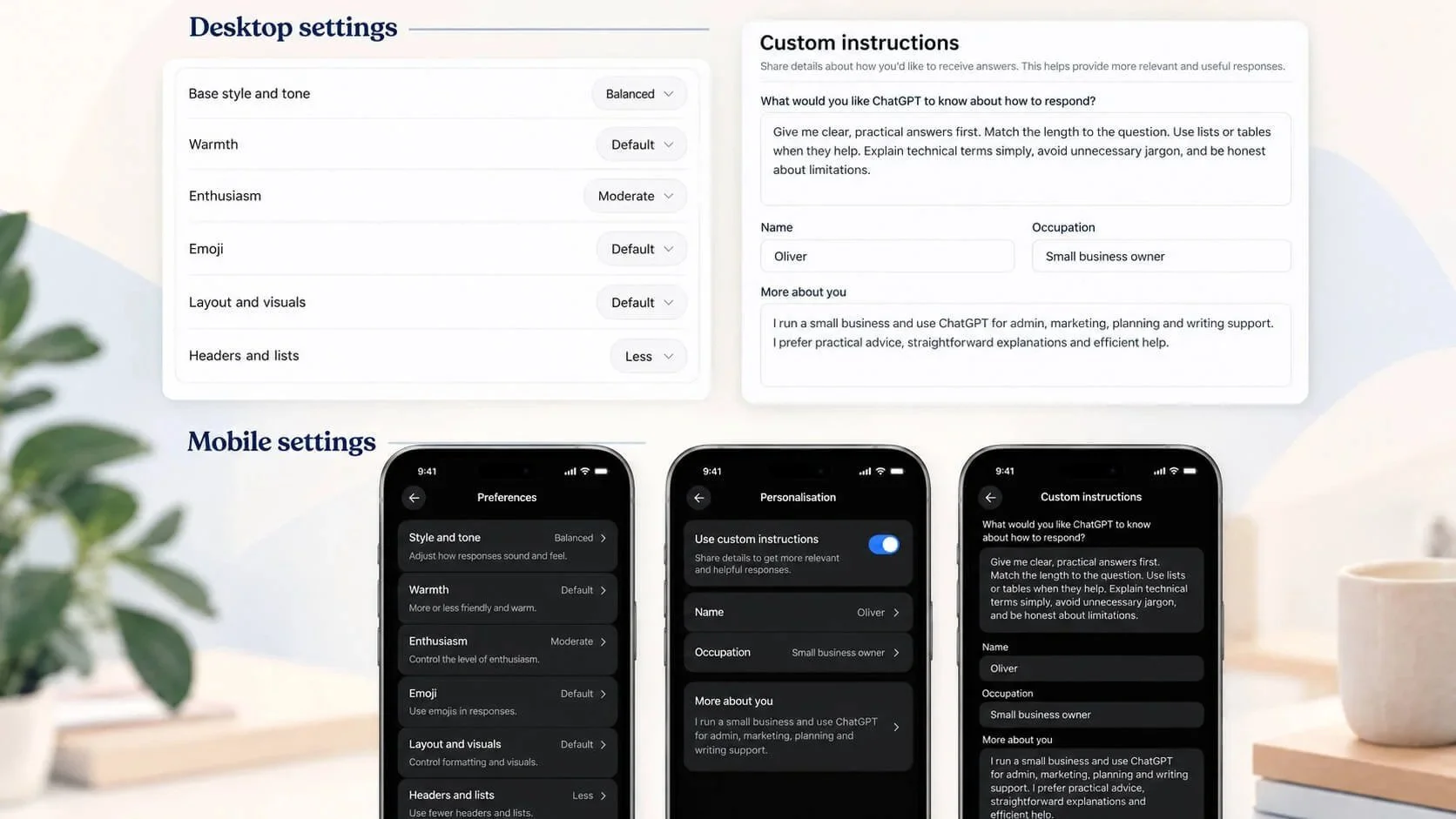
2. What Can You Personalise?
ChatGPT offers several ways to tailor your experience. They perform different jobs, and understanding these differences will help you get better results.
Base Style and Tone
This provides the starting personality for your conversations.
You may see options such as Default, Friendly, Candid, Professional, Efficient or other available styles.
Some favour friendly conversation, while others emphasise direct answers, professional language or creative expression.
Think of this as selecting the general character of your ChatGPT.
Characteristics
These let you fine-tune how that personality communicates.
Depending on your account, you may find controls for:
Warmth: How friendly or emotionally expressive the conversation feels.
Enthusiasm: How energetic and enthusiastic ChatGPT sounds.
Headers & Lists: Whether answers favour organised sections and bullet points or flowing paragraphs.
Emojis: How frequently emojis appear in responses.
For example, somebody who enjoys lively conversations but dislikes long paragraphs might increase Enthusiasm, Headers & Lists and Emojis.
Somebody using ChatGPT primarily for business research might prefer a more restrained presentation.
Neither approach is better. It's about what works for you.
Custom Instructions
This is where personalisation becomes particularly interesting.
Custom Instructions allow you to explain how you want ChatGPT to behave, communicate, reason through questions and present information.
You can specify whether you prefer short or detailed explanations, direct advice, carefully ranked recommendations, a particular language or a conversational style. You can also explain behaviours you dislike, such as excessive reassurance, unnecessary follow-up questions or overly formal language. And you can fine-tune the warmth and tone of professional answers beyond the basic Characteristics controls.
Your conversation language doesn't have to be on the app's language list. The language setting for ChatGPT's menus and interface is different from the language it can attempt to use in conversation. In a multilingual country, for example, you may prefer a regional language or dialect rather than the national language.
Try asking: "Can we chat in [my preferred language or dialect]? Please use natural everyday language, and tell me if you're unsure of a phrase." Have a short conversation and see how it sounds. You can also test it in Voice if that's how you normally chat. Fluency, dialect accuracy and speech recognition can vary, so don't assume every language will work equally well.
If you're happy with the result, add your preferred conversational language to Custom Instructions. You can also specify a second-choice language and one you'd rather avoid.
These instructions help shape how ChatGPT presents its answers, without changing the underlying need for accuracy and sound reasoning. We'll use this powerful field in the first interview below.
Information About You
Fields such as Nickname, Occupation and More about you help ChatGPT understand the person it's speaking with.
Your interests, hobbies, experience, language preferences and everyday activities can all help make its responses more relevant.
You don't need to provide private information or write your autobiography. A few useful, lasting details are usually more valuable than a lengthy personal history.
3. Let ChatGPT Help You Personalise ChatGPT
Here's where things get interesting.
Rather than expecting you to work out precisely which settings to choose or write your own Custom Instructions, why not ask ChatGPT to interview you?
You can have a perfectly ordinary conversation in which ChatGPT asks about your preferences, explores what you like and dislike, and gradually helps you develop a personality that suits you.
I've prepared two prompts to make this straightforward.
The first explores how you want ChatGPT to communicate. The second helps it understand more about you.
There's no need to answer everything in one go, and you can change your mind as you go along.
Prompt 1: Discover Your Ideal ChatGPT Personality
Copy the following prompt and paste it into a new ChatGPT conversation.
Discover Your Ideal ChatGPT Personality
These are the complete instructions to give ChatGPT. Read through them, then use the button below to copy everything into a new ChatGPT conversation.
I want your help personalising my ChatGPT so it communicates in a way that genuinely suits me.

Please interview me to discover my ideal ChatGPT personality, conversation style and response preferences.

Explore the following areas:

- How direct, friendly, serious, confident or informal I prefer conversations.
- Whether I enjoy humour, enthusiasm, emojis, lively conversation or straightforward factual answers.
- How much explanation I want for simple and complicated questions.
- Whether I prefer paragraphs, headings, bullet points or ranked recommendations.
- How I want you to handle facts, research, uncertainty, mistakes and professional advice.
- My preferred languages or dialects and natural conversational style, including whether I want the same language for voice and text.
- Anything about ChatGPT's current behaviour that frustrates me.

Ask me a few questions at a time, using simple choices when helpful. Let me explain my preferences in my own words.

Don't assume what I want or rush to conclusions. If I choose a language or dialect that isn't in the app's language menu, help me test it briefly, tell me if your fluency seems limited and include a sensible fallback language in the instructions.

When you've gathered enough information:

1. Recommend appropriate Base style and tone, Warmth, Enthusiasm, Headers & Lists and Emoji settings, where available.
2. Write practical Custom Instructions that reflect my preferences and are ready to copy into ChatGPT.
3. Keep the instructions within the available character limit.
4. Explain briefly why you've recommended these settings.
5. Invite me to review and refine your recommendations before we finish.

Keep the quality of reasoning, research and factual accuracy unchanged. I want to personalise how ChatGPT communicates, not reduce how carefully it thinks.

Please begin by asking your first questions.
Prompt 2: Help ChatGPT Understand Who You Are
Once you've developed your preferred conversational style, you can use this second prompt to create a personal profile.
This is about your background, interests, experiences and everyday preferences rather than how ChatGPT should behave.
Copy the following into a new conversation.
Help ChatGPT Understand Who You Are
These are the complete instructions to help ChatGPT learn about your background, interests and preferences. Read through them, then use the button below to copy everything into a new ChatGPT conversation.
I want your help creating a useful personal profile for the "More about you" section of my ChatGPT Personalisation settings.

Please interview me to understand my background, interests, everyday life and preferences, so ChatGPT can give me more relevant and practical answers.

Explore subjects such as:

- My general background and where I live.
- My occupation, experience and everyday activities.
- My hobbies, interests and favourite subjects.
- Food, cooking, shopping, entertainment and other preferences.
- My confidence with technology and areas where I appreciate guidance.
- Projects, ambitions or skills I want to develop.
- My preferences when comparing products, making decisions or learning something new.
- Other lasting information that would genuinely improve future conversations.

Ask me a few straightforward questions at a time. Keep it conversational rather than making it feel like an official form.

Don't request unnecessary sensitive information, such as passwords, precise addresses, medical records or financial details. Let me skip any question.

When you've gathered enough information:

1. Write a concise, natural "More about you" profile in the first person, ready to copy and paste.
2. Focus on useful, reasonably lasting information rather than temporary circumstances.
3. Avoid unnecessarily repeating personality instructions that belong in Custom Instructions.
4. Keep the profile within the available character limit.
5. Let me review, correct and refine the wording before I use it.

Don't invent details or make assumptions about my circumstances or personality.

Please begin the interview.
4. Putting Your New Personality Into Practice
Once you've completed the interviews, you'll have recommendations for your personalisation settings and two pieces of text ready to use.
Return to your ChatGPT Personalisation settings.
Choose your recommended Base style and tone and adjust the available Characteristics.
Copy your new Custom Instructions into the appropriate field and your personal profile into More about you.
Save your changes where required.
Now comes the important part: test it!
Have a few normal conversations with ChatGPT.
Try asking a factual question, requesting a recommendation or having a casual conversation about something you enjoy.
Does it feel natural? Are the responses too long? Too serious? Perhaps too enthusiastic or not conversational enough?
Your first attempt doesn't have to be perfect.
Return to the conversation where you developed your instructions, explain what you'd like to change and ask ChatGPT to revise them. If you've chosen another language or dialect, test that in everyday conversation too — not just with one phrase.
You might say:
"I'm happy with the accuracy of your answers, but the conversation still feels too formal. I'd like you to be more spontaneous and direct without giving longer explanations."
ChatGPT can then adjust the instructions, which you can copy back into your settings.
It's an ongoing process of refinement, not something you must get right the first time.
Remember that generating instructions in a conversation doesn't necessarily change your account settings. You should check that your chosen instructions have actually been saved.
5. What About ChatGPT Memory?
Memory is related to personalisation, but it isn't the same thing.
When enabled, Memory can help ChatGPT use relevant information from previous conversations and other supported sources so you don't have to keep repeating yourself.
For example, it might learn about your interests, regular projects or preferences.
However, Memory is selective. You shouldn't assume it retains everything you say, and important information may need correcting or updating.
You can review the available Memory settings under Settings → Personalization → Memory. Depending on your account, you may also be able to review a Memory summary and request corrections.
It's also worth reviewing your privacy and data controls. You should remain comfortable with the information you choose to share.
Personalisation instructions give ChatGPT deliberate guidance about how to communicate. Memory helps provide ongoing context. Used together, they can make the experience more useful.
6. Make ChatGPT Your Own
There's no universal ideal ChatGPT personality.
You may want an energetic conversational companion, a patient teacher, a practical research assistant or a completely straightforward tool that delivers information without unnecessary personality.
You may even discover that your preferences change depending on how you use it.
The important thing is that you are in control of the experience.
Spend a little time experimenting, give ChatGPT clear feedback and don't be afraid to change the settings if something isn't working.
Personalisation won't make ChatGPT infallible. It can still misunderstand questions, make mistakes or present information that needs verification.
But it can make the process of asking questions, exploring ideas and getting practical help considerably more enjoyable.
Your ChatGPT should work for you, not the other way around.
